Lab 0 - Math 173A#
This lab is due Wednesday of Week 1, by 11:59pm.
You are encouraged to work in groups of up to 3 total students, but each student should make their own submission on Canvas. (It’s fine for everyone in the group to have the same upload.)
Put the full names of everyone in your group (even if you’re working alone) here. (This makes grading easier.)
Names:
Instructions to create a workspace for your group#
One group member should create a workspace for the group using the following instructions. By upgrading to the (free) Education plan as described here, the hardware Deepnote provides to you should be more reliable.
Click on the workspace name “Math 173A Y23” at the top left, then click the “+” icon next to your name.
Choose the “Free” plan if you are asked to choose a plan.
Give your workspace a name, like “Lab 0 group”. Select the option “Education”.
Invite your groupmates, giving them “Editor” or “Admin” access. Then click the “Create Workspace” button.
Click on “Settings & members” on the left side, then “Upgrade”, then “Upgrade to Education”.
If you click on the … next to this
Lab 0project, you should be able to duplicate it into your the new workspace you just created. Once you have this duplicate copy, you can edit it.
Import a Python helper file#
Go to the
Filessection on our Canvas course space, and download the fileLab0_Helper.pyin thePython filesfolder.Upload this
Lab0_Helper.pyfile into theFilessection on the right-hand side of this workspace. (Hit the plus icon, or click and drag the file.)Import several functions defined in that uploaded file by evaluating the following code. (Copy and paste it into a new cell, and then evaluate by holding down Shift and hitting Enter.)
from Lab0_Helper import shift_string, only_letters, english_freq, get_freq, mut_ind_co
Learn about the imported functions#
Warning. There might be some slight differences between these functions and the functions we used during lecture on Monday. But the differences should be minor. For example, maybe one function returns letters in upper-case and the other function returns letters in lower-case.
Check that
shift_stringis working by evaluating the following.
X = "yeah"
shift_string(X, 3)
Check that
only_lettersis working by evaluating the following code. (Notice that the number disappears, the same as the punctuation and spaces.)
X = "Hello, and welcome to Math 173A!"
only_letters(X, case="lower")
Check that
get_freqis working by evaluating the following code.
get_freq("Hello there")
The result should be a Python dictionary whose keys are the lowercase letters, and whose values are the proportions which which those letters appear in the string. For example, the letter “e” appears three times and there are ten total letters, so the value for "e" is the real number 0.3.
If you evaluate
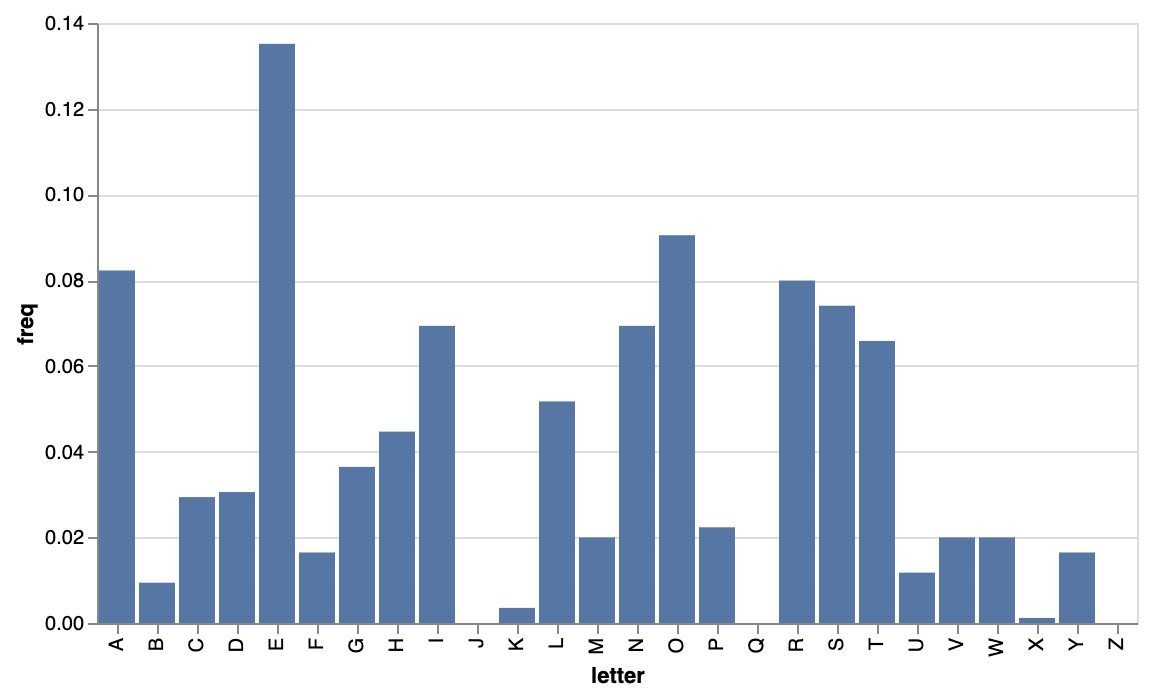
english_freq, you should see a similar dictionary, with estimated proportions for “average” English text. (These were calculated by computing the proportions from the book A Tale of Two Cities.)
The function
mut_ind_cois meant to be used with frequencies for two different pieces of text, but you can also use it by repeating the frequency for a single piece of text. This should produce a real number which is an estimate for the probability that two randomly chosen English letters are equal. The following computes the Mutual Index of Coincidence between our “average” English text and itself.
mut_ind_co(english_freq, english_freq)
Letter frequencies#
Paste in a block of English text, surrounded by triple quotation marks (this helps prevent errors due to apostrophes), and store the resulting string using the variable
s:
s = '''Your text goes here. It can be long and include linebreaks.'''
Evaluate
get_freq(s).
How do these values compare to the percentages shown in Hoffstein-Pipher-Silverman (HPS), Table 1.3 on page 6? (Your answer will depend on how long your block of text was. Notice that HPS reports percentages, and the
get_freqfunction reports probabilities or proportions.)
Briefly answer this question in a markdown cell (you can click the three lines on the right side of this cell and select “add markdown cell”).
Mutual Index of Coincidence#
For your same string
sas above, compute the Mutual Index of Coincidence withenglish_freq. For suitably long English text, the value should be around0.065. (As long as the value is above0.06and below0.075, that is a good range.)
Make a new string
tof random text (not English, just hit random keys on the keyboard, but try not to repeat the same letters to an extreme degree).
Again compute the Mutual Index of Coincidence with
english_freq. The new value should be closer to0.04or0.05.
Automated decryption#
Write a function
shift_decryptto automatically decrypt ciphertext that has been encrypted using a shift cipher. Use the following pseudocode as your template. (Even if you have an alternate approach, for this assignment, you should follow this pseudocode. Or at least check with Chris first before using a different approach.)
Function name:
shift_decryptInput: A string
YOutput: A tuple containing decrypted plaintextXalong with the shift amount used for decryption.Strategy: For each possible shift amount from
0(inclusive) to26(exclusive), shiftYby this amount, and compute the Mutual Index of Coincidence between the resulting text and English. Return the shifted text for which the Mutual Index of Coincidence with English is highest, along with the corresponding shift amount.
Here is a template to help you with the syntax and strategy. In this template, rather than using the above strategy, we return the shift amount for which the frequency of the letter "E" is highest. If you already are pretty comfortable with Python, try to see how far you can get without using this template.
import numpy as np

def naive_decrypt(Y):
    holder = np.zeros(26)

    for i in range(26):
        X = shift_string(Y, i)
        holder[i] = X.count("E")

    # np.argmax finds the location of the maximum value.
    # (If the maximum is obtained multiple times, only the first index is returned.)
    shift_amt = np.argmax(holder)
    X = shift_string(Y, shift_amt)

    return (X, shift_amt)
Testing the shift_decrypt function#
Encrypt the string
"INTROCRYPTOGRAPHY"using a shift cipher. (Use theshift_stringfunction… don’t do this by hand.) Store the resulting ciphertext using the variable nameY.
Evaluate
Y(there’s no need to useprint, just execute a code cell withYin it) to see what the encrypted text looks like.
Does your
shift_decryptfunction find the true plaintext in this case?
Notice that the returned shift amount is different from the shift amount you used for encryption (unless you chose a shift amount of
0or13). Briefly explain why that’s the case in a markdown cell.
(Notice that a different shift amount being returned is not an indication of a mistake in our code.)
Try evaluating
naive_decrypton the ciphertext you made. (You’ll first need to execute thenaive_decryptcode by pasting it into a code cell and then evaluating that cell.)
How could we have known in advance that the naive strategy would not work in this case? Briefly explain in a markdown cell.
Find an example of text for which your
shift_decryptfunction does not work. Try to make the original English text at least a few words.
Submission#
Using the
Sharebutton at the top right, enable public sharing, and enable Comment privileges. Then submit the created link on Canvas.
(Don’t just copy the browser URL. Copy the link that is provided after you click the “Share” button. It won’t be available until you enable public sharing.)
Reminder: Everyone in the group needs to submit this link on Canvas.
 Created in Deepnote